Facebook
 YouTube
 LinkedIn
 BNI
TL;DR: tawk.to is free, solid live chat that works best when someone’s around to answer it. Knock Knock is a paid tool that qualifies and scores your website visitors, then pushes them into your CRM while you’re busy doing other things. If your chat is mostly support, tawk.to will do the job. If you’re looking for a tawk.to alternative because you’re flat out and missing sales enquiries, Knock Knock is the better fit.
tawk.to: free core product with unlimited agents and chats. The AI add-on starts at US$29 a month.
Knock Knock: the AI asks qualification questions, scores intent and sends a summary into GoHighLevel or HubSpot.
Neither tool can tell you the name of every anonymous visitor.
Pick tawk.to for support on a tight budget. Pick Knock Knock if missed sales enquiries are costing you work.
Someone lands on your website on a Tuesday morning, pokes around your services page, and is clearly interested. By the time you check your inbox that evening, they’ve gone, and you never even knew they were there. That stretch between a visitor showing interest and someone in your business finding out is where a lot of small businesses quietly lose work. I want to be upfront before we compare anything. A chat widget won’t increase sales on its own. What a good tool can do is shorten the time between someone showing interest and you knowing about it.
So if you’re weighing up a tawk.to alternative, that’s the fair way to compare tawk.to and Knock Knock. One is a free live chat platform that’s been around a long time. The other is a paid tool built to turn website traffic into qualified, booked conversations. They overlap in places, but they answer different questions, and the right pick depends on which question matters more to your business.
What does tawk.to give you for free?
Credit where it’s due. tawk.to gives you its whole core product free. That’s unlimited agents, unlimited chats and unlimited sites, which is rare, and really handy for a small team. It also does a lot more than a basic chat bubble. You get ticketing, a knowledge base, a lightweight CRM, and messaging across channels including Facebook Messenger, SMS, Telegram and WhatsApp, according to this detailed tawk.to review.
It has real AI, too. The free tier includes 100 AI message credits a month, which cover suggestions to your staff or direct replies to customers. Past that, the AI Assist add-on starts at US$29 a month. And tawk.to has proactive chat triggers, so it can start a chat on its own instead of sitting there waiting for one.
There are limits worth knowing. AI Assist is designed for support. It’s good at answering questions, and it isn’t built to run conversations fully on its own the way some dedicated AI sales tools are. So it won’t qualify a lead and hand you a summary. That part’s still on you.
Key point: tawk.to gives a small team a lot for free, including proactive chat and some AI. Because it’s built for support, qualifying leads is still human work.
Knock Knock as a tawk.to alternative: what is it built to do?
Knock Knock is set up as a sales tool first. Every visitor gets an instant way to chat, call, or start a live video conversation. The AI then asks qualification questions (budget, timeline, team size) and prepares a CRM-ready summary for whoever follows up, as described in the Knock Knock knowledge base.
The CRM connections are built in. With GoHighLevel, identified visitor details flow straight into the CRM and trigger workflows, pipelines and email or SMS sequences. With HubSpot, a new contact is created the moment a visitor is identified, with transcripts and lead scores logged against that contact. If your business already runs on either platform, that cuts out a lot of copying and pasting. Which is usually the job that gets left until the end of the day, and then forgotten.
At Gecko Gully, I am working on integrations with other CRM platforms, so that you should be able to connect Knock Knock with any CRM once I have this going. Contact me if you want to discuss your needs, and keep you in the loop.
Key point: Knock Knock is built to qualify leads and get them into GoHighLevel or HubSpot with very little manual work from you.
Tracking, recognition and enrichment: what’s the difference?
This is where comparisons often get muddled, so let me separate four different things.
Tracking an anonymous session means watching what an unknown visitor does on your site. Both tools do this.
Recognising a known contact means matching a returning visitor to someone who has previously identified themselves.
Identifying a company means working out which business a visitor likely comes from.
Enriching a contact record means adding details, such as transcripts and scores, to a contact you already have.
Neither product can reliably tell you the name or email address of every anonymous visitor. If anyone promises you that, walk away. What Knock Knock adds on top of basic tracking is intent scoring. A visitor earns +20 points for starting a chat or call, or accepting an agent message, and behavioural tracking flags high-intent visitors before they leave. So raw traffic data turns into something you can actually act on.
Key point: Both tools track visitors. Knock Knock also scores how interested they are, which tells you who to follow up first.
How do qualification, booking and follow-up compare?
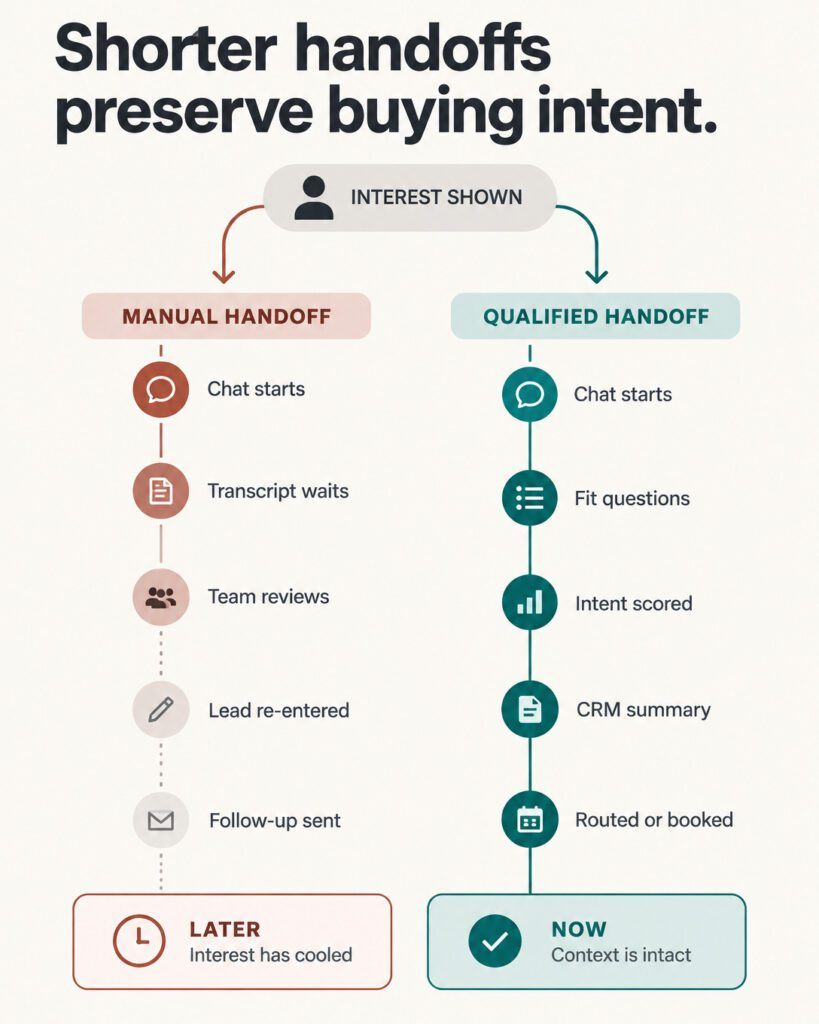
With tawk.to, qualifying a lead is mostly human work. A visitor messages, and you or a staff member reply, ask questions, and decide whether this person is worth a meeting. The triggers and AI can start and hold a conversation. But turning that into a booked appointment, with notes in your CRM, is your job afterwards.
Knock Knock automates more of that sequence. It qualifies the lead, routes the conversation, scores intent, and pushes the result into GoHighLevel or HubSpot, where booking workflows and follow-up sequences can fire automatically. The practical difference is what lands on your desk. With one, you get transcripts to work through. With the other, you get a scored, summarised lead already sitting in your pipeline.
Key point: tawk.to can start the conversation, but booking and notes are your job afterwards. Knock Knock takes more of that off your plate because it feeds the result straight into your CRM.
What does this look like on a busy day? A hypothetical example
This is a made-up scenario, included to show the practical difference. It is based on no particular client.
Picture a plumbing and heating firm with six staff. The owner quotes jobs all day and can’t watch a chat screen. At 11am, a facilities manager visits the website, reads two service pages and the pricing page, and has fifteen minutes before her next meeting.
With tawk.to installed, a trigger can open a chat and the AI can answer her questions from the knowledge base, as long as there are message credits left. If she asks something it hasn’t been trained on, the chat sits in the inbox. The owner finds it at 5pm, reads the transcript, and emails her. Hopefully she still remembers the conversation.
With Knock Knock, the AI asks about her budget, timeline and the size of her site, scores her as high intent, and either offers a call or books a meeting through the connected CRM workflow. The owner finishes quoting and finds a qualified lead with a summary and an appointment, instead of a transcript to decode. He still has to turn up prepared and win the work. Knock Knock just made sure the enquiry didn’t slip away while he was busy.
Key point: The difference shows up when the owner can’t get to the screen. One tool leaves a message waiting, the other leaves a qualified lead and often a booked meeting.
How do they compare side by side?
Main job: tawk.to is built for support and communication. Knock Knock is built for sales and lead qualification.
Price: tawk.to is free at the core, with add-ons. Knock Knock is a paid subscription.
AI: tawk.to includes 100 AI message credits a month, with AI Assist from US$29 a month. Knock Knock’s AI asks qualification questions and writes a CRM-ready summary.
Ways to talk: tawk.to covers chat plus channels like Messenger, SMS, Telegram and WhatsApp. Knock Knock offers chat, call and live video.
Visitor tracking: both track anonymous sessions. Knock Knock adds intent scoring.
CRM: tawk.to has a lightweight built-in CRM. Knock Knock connects natively with GoHighLevel and HubSpot.
White-labelling: tawk.to has a branding-removal add-on (US$19 a month). Knock Knock offers full white-labelling by default.
What does each one really cost?
(Pricing is correct as at the time of writing; please check each product’s website before making a decision.)
tawk.to really is free at the core, with add-ons charged separately. Branding removal costs US$19 a month and the AI chatbot US$29 a month. These stack, so a professional setup comes to roughly US$48 a month, according to this pricing breakdown. That’s still modest money. The bigger cost is staff time, because the free model assumes someone is around to answer, qualify and follow up.
Knock Knock costs more each month, but it needs less of your attention. You still need a person to take the booked calls and do the actual selling. And you need to set up and train the AI properly at the start. If your sales process is vague, automating it just gets you to the same mess quicker. So be clear on your qualification questions and handover points before you switch anything on.
For agencies, Knock Knock supports full white-labelling by default, including your own logo in client dashboards and notifications. That makes it resellable in a way tawk.to’s branding-removal add-on isn’t really designed for.
Key point: A properly set up tawk.to runs about US$48 a month, plus the staff time to answer chats. Knock Knock costs more in subscription, so check current pricing at GHLknock.com and weigh it against the hours you’d get back.
Should you stick with tawk.to or switch to an alternative?
If your website chat mostly handles support questions, someone on your team is usually free to reply, or money is genuinely tight, tawk.to is the sensible choice. It’s a remarkable amount for nothing, and I wouldn’t talk anyone out of it for those uses.
But if you care most about sales conversations and qualified enquiries, and nobody can watch the screen during the day, the evidence I could check points to Knock Knock as the better fit. The AI qualification, the intent scoring, the CRM connections and the chat, call and video options all do one job. They get a serious enquiry in front of a real person while that person is still interested. For a service business with 2 to 20 staff and an owner who’s flat out, that matters more than the chat widget being free.
Key point: tawk.to suits support-heavy chat and tight budgets. Knock Knock suits busy owners who are losing sales enquiries because nobody’s free to reply.
Affiliate disclosure: I may earn a commission if you sign up to some software through my link.
If that sounds like your business, have a look at Knock Knock and decide for yourself whether it suits how you actually sell. And if you’re happy with tawk.to, that’s a perfectly good answer too.
Frequently asked questions
Is tawk.to really free?
Yes. The core product, including live chat, ticketing, a knowledge base and unlimited agents, costs nothing. Branding removal (US$19/month) and the AI chatbot (US$29/month) are paid add-ons.
Does tawk.to have AI, or is it just a chat bubble?
It has real AI. The free tier includes 100 AI message credits a month, and the AI Assist add-on answers customers across six channels. It’s built for support, so it won’t qualify sales leads for you.
Can either tool tell me the name of every visitor?
No, and neither claims to. Both track anonymous sessions. Knock Knock adds behavioural intent scoring and enriches CRM records once a visitor identifies themselves through a chat, call or form.
Do I need GoHighLevel or HubSpot to use Knock Knock?
The native integrations with GoHighLevel and HubSpot are where much of the value sits, since qualified leads, transcripts and scores flow into your CRM automatically. Check the current integration list at GHLknock.com for your setup.
Also, as I said above, at Gecko Gully I am working on integrations with more systems, including generic integrations that should work with most CRMs (yes, I am a programmer!).
Which is better if nobody can monitor chat during the day?
Knock Knock handles more of the conversation unattended, including qualification and routing towards a booking. tawk.to’s AI can answer questions within its credits, but qualification and follow-up remain manual work for you afterwards.
Which one is easier to set up?
tawk.to is quicker for basic chat. Knock Knock needs more work at the start, because you have to set up and train the AI and be clear on your qualification questions first.
Can I white-label either tool?
Knock Knock supports full white-labelling by default, including your logo in client dashboards and notifications. tawk.to has a branding-removal add-on at US$19 a month, but it isn’t really designed for reselling.
Does Knock Knock replace a salesperson?
No. It catches and qualifies the enquiry. You still need someone to take the call, turn up prepared and win the work.
What is the best tawk.to alternative for sales enquiries?
It depends what you need your chat to do. If you mainly want to catch and qualify sales enquiries while you’re busy, Knock Knock is built for that job. If chat is mostly support and someone’s usually free to reply, tawk.to’s free plan may be all you need.
Key takeaways
tawk.to is free at the core. A professional setup costs about US$48 a month in add-ons.
tawk.to’s AI is built for support, so qualifying leads and following up stay manual.
Knock Knock asks qualification questions, scores intent and sends summaries into GoHighLevel or HubSpot.
Neither tool can name every anonymous visitor, whatever anyone tells you.
If you’re flat out and missing sales enquiries, Knock Knock is the better tawk.to alternative. If chat is mostly support, tawk.to does the job.