

TL;DR: A South Canterbury agricultural contractor was spending 40 minutes creating each quote, wasting 20+ hours weekly during the busy season. By implementing practical business automation in New Zealand’s rural context, we first built a simple CRM foundation, then connected scattered systems through workflow automation and AI-assisted tools. Result: 15.5 hours saved per week, three new clients onboarded, and weekends back.
The situation: 40-minute manual quoting process eating 20-25 hours weekly
The root cause: Customer data scattered across accounting software, emails, paper diary, and memory
The solution: Centralised CRM, automated quote generation, shared availability calendar, AI-assisted follow-ups
The results: 15.5 hours saved weekly, forward bookings increased from one week to one month, and three new clients were onboarded
The lesson: Automate the repetitive admin, not the expertise
The Problem: Buried Under Admin
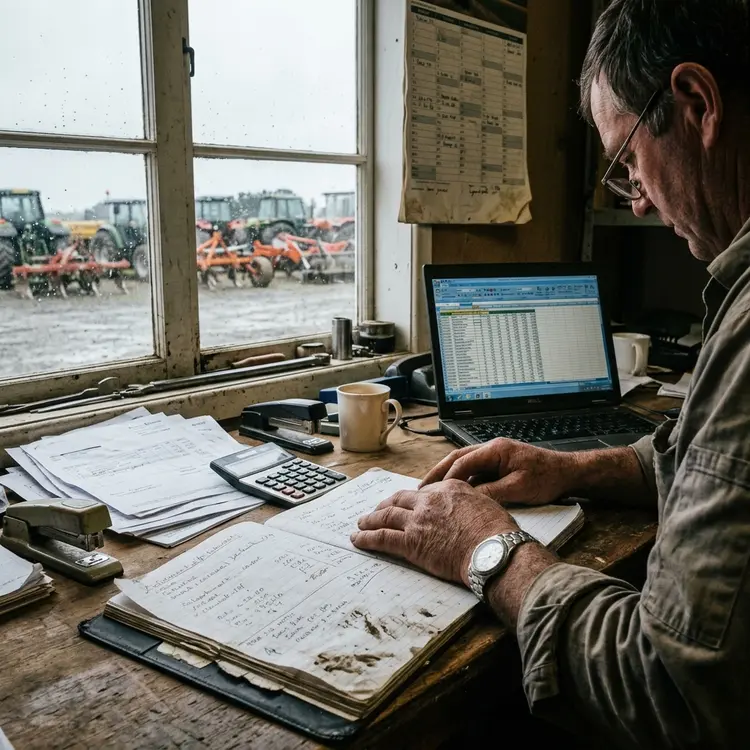
Tuesday morning, South Canterbury. His office was a converted garage behind his house.
He ran an agricultural contracting business. Muck spreading, ploughing, grading and harvesting. The kind of work that keeps rural New Zealand running.
But he wasn’t buried in work. He was buried in the admin—quotes, specifically.
I watched him create one quote:
Read the email from the farmer
Copy details into the spreadsheet
Transfer to accounting software
Open Word template
Type everything manually
Calculate pricing
Email back
Time taken: 40 minutes.
During the busy season, 30-40 quotes per week. The maths was brutal: 20 to 25 hours copying information that already existed in his systems.
“That’s how we’ve always done things,” he said.
That sentence told me everything.
Bottom line: The problem wasn’t complexity. The problem was invisible waste becoming normal.
Why Agricultural Contracting Quotes Are Complex
Agricultural contracting quotes aren’t simple. You’re not pricing a product. You’re pricing skill, time, distance, equipment, and variables.
Each quote needs:
Job type (muck spreading, ploughing, grading, harvesting all have different pricing)
Paddock size
Travel distance to property
Equipment requirements
Time estimate (hours or days)
Current fuel costs
Seasonal demand pricing
Where was his data? Google Maps for distances. Paper diary for equipment availability. Old emails for customer history. Spreadsheets for pricing. His memory for fuel costs.
When a farmer rang back asking, “How about 50 hectares instead of 30?” he’d recalculate everything manually.
Key insight: The information existed. Systems forced him to hunt for information he already had.
The Scepticism Was Justified
When I proposed connecting all these scattered pieces, his first response was immediate.
“Yeah, but every job is different. No system can know what I know.”
He was worried that automation would mean losing control over his pricing decisions. He’d built relationships with these farmers over 20 years. He knew which ones paid on time, which properties had tricky access, and which jobs always took longer than expected.
He thought I was going to hand him some off-the-shelf software that would spit out generic quotes.
Honestly, he was right to be sceptical.
I’ve seen plenty of consultants try to force rural businesses into systems designed for office workers in Auckland. Systems that assume reliable internet, IT support on call, and workflows that don’t change with the seasons.
What he didn’t realise yet was that I wasn’t trying to replace his knowledge.
I was trying to stop him from wasting it on copying and pasting when he could be using it actually to grow the business.
Key insight: Scepticism is smart. Off-the-shelf solutions fail when they ignore how rural businesses work.
The Visualisation That Changed Everything
I sat down with him and said, “Walk me through your absolute worst quoting scenario. The one that makes you want to throw your computer out the window.”
He told me about a farmer who’d rung to ask for a quote for muck spreading across three different properties. Different-sized paddocks. One with difficult access. Needed it done within a specific two-week window.
Normally, that quote would take him over an hour.
He’d have to look up each property separately, calculate travel between them, figure out whether he could schedule them efficiently, check fuel prices and work out whether he had the right equipment available on those dates.
So I grabbed a piece of paper and drew out his current process. Literally every single step. Every system he touched. Every time he re-entered the same information.
When he saw it visualised like that—all those loops and duplications—he just stared at it.
“Bloody hell, no wonder I’m always behind.”
That’s when he got it.
The problem wasn’t his knowledge. The problem was that the systems were forcing him to use that knowledge inefficiently.
He knew exactly what needed to be in the quote. He shouldn’t have to type the farmer’s address four separate times to get there.
What changed his mind: Seeing his process visualised showed him that the waste lay in the systems, not in his expertise.
Starting With the Foundation Nobody Wants to Build
Everyone assumes you start with the quoting tool itself.
That’s backwards.
His customer data was the foundation for everything. Farmer names, property addresses, paddock sizes, access notes and payment history.
It was split between his accounting software, old emails, and literally a notebook he kept in his ute.
Before I could automate anything, we needed one clean source of truth for customer information.
So we built a simple CRM. Nothing fancy. Just centralised customer records with all the relevant details he actually needed.
Property locations. Typical job types. His notes about tricky access or timing preferences. Payment terms.
Once that existed, everything else could pull from it. The quoting system. The scheduling. The invoicing.
They all needed that same customer data.
It wasn’t sexy. It didn’t immediately save him hours.
But it was the foundation.
He was frustrated at first because he wanted to fix the quotes immediately. I told him, “We do this right, or we don’t do it at all.”
Two weeks later, when we connected the CRM to his quoting process and he could auto-populate a quote with a farmer’s details in three clicks instead of hunting through emails, he understood why we’d started there.
Why this mattered: Building the foundation first meant everything else connected easily—three clicks instead of hunting through emails.
From Sceptic to Co-Creator
Once he saw that first connection work, everything shifted.
He went from sceptical to almost impatient.
He started coming to our check-ins with ideas.
“Could we pull in fuel prices automatically instead of me checking the petrol station website?”
“What if the system could calculate travel time between jobs so I know if I can fit two in one day?”
“Can we make it so when a farmer emails asking for a quote, it creates a record automatically instead of me copying it into the spreadsheet?”
Some of his ideas were brilliant. Some weren’t quite feasible with his existing systems.
But the shift was massive.
He’d gone from “I don’t think this will work for my business” to “What else can we connect?”
The best one was when he said, “You know what really wastes time? Farmers are ringing me asking if I’m available next week, and I have to flip through my diary while they’re on the phone.”
He wanted a simple availability calendar he could share so farmers could see his schedule on their own.
That wasn’t even on my original scope, but it was such a smart idea that we built it in.
That’s when I knew the project would actually succeed in the long term. Because he’d stopped seeing automation as something being done to him and started seeing it as a tool he could shape around how he actually worked.
The shift: From “automation is being done to me” to “automation is a tool I control.” That’s when success becomes sustainable.
The Unexpected Benefits of Transparency
The shared availability calendar was supposed to save him from having to interrupt phone calls.
Something unexpected happened instead.
Farmers started booking further in advance.
Before, they’d ring him the week before they needed work done. Half the time, he was already booked out, so they’d have to wait or go to a competitor.
With the calendar visible, they could see he was getting busy three weeks out during harvest season. So they’d book earlier to secure their slot.
His forward bookings went from maybe a week to nearly a month ahead during peak times.
The unintended consequence was better cash flow predictability and less last-minute scrambling.
But here’s the thing, he didn’t expect.
It also reduced the “mate, can you squeeze me in?” calls.
When farmers could see he was genuinely booked solid, they stopped asking for favours or assuming he had gaps.
It actually made those difficult conversations easier because the calendar was the bad guy, not him.
He said to me, “I thought this was about saving me admin time, but it’s actually changed how farmers work with me.”
That’s when automation really works. When it solves problems you didn’t even know you had.
Real automation benefit: Solving problems you didn’t know existed. Forward bookings increased. Cash flow improved. Difficult conversations became easier.
AI Without the Hype
I was really careful with AI because I’ve seen too many consultants throw ChatGPT at everything and call it innovation.
For him, AI wasn’t about being clever. It was about handling the repetitive stuff that still needed a human touch.
The big one was follow-up emails.
He’d send a quote, and if he didn’t hear back in a few days, he should follow up. But he never had time.
So quotes would sit there. He’d lose work because farmers forgot or went with someone more persistent.
We set up an AI tool that would draft follow-up emails based on the original quote. Nothing fancy.
Just “Hi [farmer name], just checking if you had any questions about the quote for [job type] at [property].”
It sounded like him, not like a robot, because we trained it on his actual previous emails.
He’d get a notification, glance at the draft, maybe tweak a line if needed, and send it.
Took him 30 seconds to write from scratch instead of 10 minutes.
The other place AI actually helped was summarising job notes.
After a big job, he’d have notes on what went well, what took longer than expected, and any access issues. Stuff he needed to remember for next time.
But he’d never have time to write it up properly, so it stayed in his head or scribbled in his notebook.
We had AI take his voice notes from the ute and turn them into structured job summaries that fed back into the CRM.
Not magic. Just practical.
He could talk for two minutes after a job, and it became a proper record he could reference when quoting that farmer next season.
Practical AI use: Draft emails in your voice. Turn voice notes into structured data. Handle repetitive tasks that need a human touch.
Measuring What Actually Mattered
We measured the time savings about three months in, once everything was properly embedded and he’d stopped second-guessing the systems.
I got him to track his time for two weeks. How long did he spend on quotes, follow-ups, scheduling and all the admin stuff?
Then we compared it to what he’d tracked right at the start before we changed anything.
The quoting alone dropped from about 20 hours a week during the busy season to maybe 5 hours.
Follow-ups that he’d mostly just not done before were happening automatically and taking him minutes to approve instead of never getting done.
The job notes from voice memos saved another couple of hours of trying to remember details later.
When I showed him the spreadsheet—15.5 hours saved per week on average—he just sat there quietly for a minute.
Then he said, “That’s nearly two full days. I’ve been working Saturdays to keep up with admin. I don’t need to anymore, do I?”
He actually got a bit emotional about it, which surprised me.
It wasn’t just about the time. It was about getting his weekends back, being less stressed and feeling like he was running the business instead of the business running him.
The really telling moment was two weeks later when he rang me and said, “I took on three new clients this month because I actually had time to return their calls.”
That’s when the 15 hours became real money, not just a nice number on a spreadsheet.
Time became money: 15.5 hours saved meant the capacity to take on three new clients. Admin time became growth time.
What Broke and Why That Mattered
The shared calendar broke first. Or rather, farmers broke it.
They loved it too much.
He started getting bookings at 10 pm, 6 am and on Sunday afternoons. Because it was automated, it would confirm them immediately.
Sounds great, except he’d wake up to five new bookings and realise two of them were for the same equipment on the same day. Or someone had booked a half-day job that was actually three hours away, so that it would take the whole day with travel.
The system didn’t know his equipment constraints or travel logistics the way his brain did.
We had to pull back and add approval steps. Bookings would go into “pending”, and he’d confirm them each morning after checking they actually made sense.
It slowed things down slightly, but stopped the chaos.
The other thing that didn’t work was the AI follow-ups during harvest season.
We’d set them to go out three days after a quote, which was fine most of the year. But during harvest, everyone’s frantic, and three days feel pushy.
He started getting responses like “Mate, I’ll get to it when I can.”
So we had to build in seasonal rules—different follow-up timings depending on the season.
The lesson was that automation can’t be completely hands-off in a business with this much variability.
He still needed to be the human making judgment calls. The systems just needed to make those calls faster and be better informed.
That’s what I mean by practical automation. It’s not set-and-forget. It’s set-and-supervise.
The reality: Automation isn’t set-and-forget. It’s set-and-supervise. Systems make better-informed decisions faster, not instead of you.
What Rural South Canterbury Taught Me
The connectivity was the biggest difference from my Melbourne clients.
In Melbourne, I can assume that clients have reliable internet access. They’re working from an office. They’ve got IT support if something breaks.
This bloke was quoting from his ute between jobs, sometimes on patchy rural 4G.
If something went wrong, he couldn’t just call the IT department. He’d call me, and I’m three hours away in Timaru.
That changed everything about how I designed the systems.
They had to work offline and sync later. They had to be simple enough that he could troubleshoot basic issues himself at 6 am in a paddock.
No fancy integrations that needed a constant internet connection.
And the seasonal variability. Melbourne businesses have busy periods, sure. But agricultural contracting goes from flat-out insane for eight weeks to relatively quiet.
The systems had to flex with that, not fight it.
The other big difference was trust.
In the city, clients expect consultants. It’s normal.
Out here, I was an outsider suggesting he change how he’d run his business for 20 years.
I had to prove myself with small wins before he’d trust me with the big stuff. That’s why we started with the CRM foundation even though he wanted to jump straight to quotes.
Rural businesses don’t have room for consultants who waste their time or money on theory.
It taught me to be more patient, more practical, and to really listen to what the business actually needs versus what I think it needs.
This project made me a better consultant because it stripped away all the fluff.
Out here, it either works or it doesn’t.
Rural reality: Patchy internet, seasonal chaos, and trust earned through small wins. Systems that work offline and flex with seasons.
What I’d Tell the Next Sceptical Contractor
If another rural contractor rang me tomorrow with the same scattered systems and 40-minute quotes, but they were sceptical about whether automation would work for their specific business, here’s what I’d tell them.
“You’re right to be sceptical. Your business is different, and generic solutions won’t work.”
“But here’s what I learned in South Canterbury: automation isn’t about replacing how you think or making decisions for you.”
“It’s about stopping you from typing the same farmer’s name into four different systems when you should be using that time actually to run your business.”
The bloke I worked with thought every job was too different to automate. He was right. Every job is different.
But pulling up a farmer’s address from your CRM instead of hunting through emails? That’s the same every time.
Calculating travel distance? Same every time.
Following up on a quote you sent three days ago? Same every time.
We didn’t automate his expertise. We automated the boring, rubbish-burying work.
And the result wasn’t just 15 hours saved.
It was getting his Saturdays back and having time to answer the phone when new clients rang.
If you’re working weekends to keep up with admin, you don’t have a business problem. You have a systems problem.
And system problems can be fixed without turning you into someone you’re not.
The takeaway: You’re not automating your expertise. You’re automating the tedious rubbish, burying your expertise.
Frequently Asked Questions
How long does it take to implement workflow automation for a rural business?
For this South Canterbury contractor, the foundation (CRM setup) took two weeks. Full implementation, including quote automation, calendar integration, and AI tools, took three months before we measured results. Rural businesses need time to test systems during different seasons.
What’s the first step in automating a quoting process?
Build a centralised customer database first. Before automating workflows, you need one clean source of truth for customer information. Everything else (quotes, scheduling, invoicing) pulls from that foundation.
Will automation work with patchy rural internet connectivity?
Yes, but systems must be designed differently. For this contractor, we built offline capability with sync-when-connected functionality. Systems had to work at 6 am in a paddock on patchy 4G.
How do you measure time savings from automation?
Track the current time spent on tasks for two weeks before changes. Implement systems. Wait until they’re fully embedded (usually 2-3 months). Track the same tasks again for two weeks. Compare.
What’s the difference between replacing expertise and automating admin?
Replacing expertise means the system makes decisions. Automating admin means the system handles repetitive data entry, lookups, and copying. This contractor still made all pricing decisions. He stopped typing the same farmer’s address four times.
Why did the automated calendar need approval steps added later?
Farmers booked appointments 24/7, but the system didn’t know equipment constraints or travel logistics—two jobs booked for the same equipment, or a half-day job three hours away. Human judgment was still needed.
How does AI help with follow-up emails without sounding robotic?
Train the AI on the business owner’s actual previous emails. The system learns tone, phrasing, and style. For this contractor, AI drafted follow-ups based on his writing; he’d glance at them, tweak if needed, and send them in 30 seconds.
What makes rural business automation different from city business automation?
Three factors: connectivity (patchy internet), seasonal variability (flat-out for eight weeks, then quiet), and trust (rural business owners need proof, not theory). Systems must work offline, flex with seasons, and deliver small wins before big changes.
Key Takeaways
Invisible waste becomes normal. This contractor thought 40-minute quotes were “how things are done” until he saw the process mapped out.
Build the foundation first. Centralised customer data matters more than fancy automation. Everything else pulls from that single source of truth.
Automation solves problems you didn’t know existed. The shared calendar didn’t save admin time; it changed how farmers booked, improving cash flow predictability.
Set-and-supervise, not set-and-forget. Automation needs human judgment for variable businesses. Systems make decisions faster, not instead of you.
Small wins build trust. Rural businesses don’t have room for theory. Prove value with simple fixes before tackling complex workflows.
15 hours saved became real money. Time savings meant he could take on three new clients because he answered their calls.
AI works when it handles repetitive human tasks, not when it tries to be clever. Voice notes to structured summaries. Draft emails based on writing style. Practical, not flashy.